A desktop player for Music Assistant

Your music.
Your own frequency.

Meet Decksona: a retro-inspired player for your desktop and your phone. Browse the Music Assistant library you already love, then control playback where it happens.

Windows & macOS·iPhone & Android web app
THE DECKSONA DESKTOP001 — A LISTENING SESSION
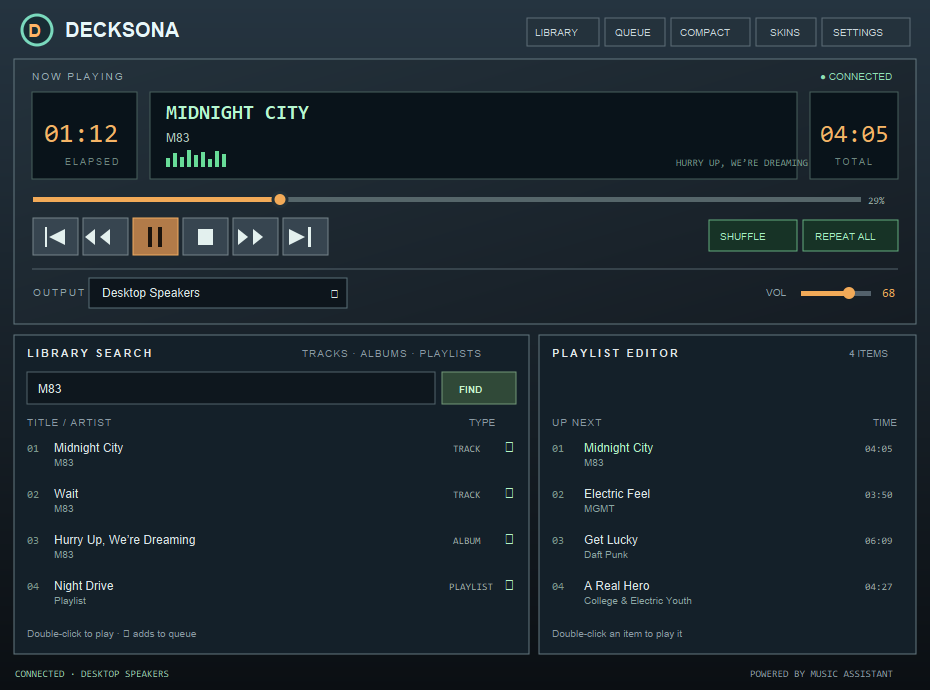
Decksona desktop player showing Music Assistant playback controls, library search and a playlist queue
One dedicated place for the music you love.▂ ▄ ▆ █ ▅ ▃ ▇
INDEPENDENT LISTENING SOFTWAREBUILT TO PLAY WELL WITH YOUR SETUP  ↘
01 A LITTLE MORE YOU

The music server
you know. A player
with a pulse.

Music Assistant brings your listening together. Decksona adds a dedicated player for desktop and phone: browse your collection, shape what plays next, and keep the controls close.

02

THE PLAYER, YOUR WAY

Everything in
its right place.

A full-featured music player with the thoughtful details that make sitting down at your computer feel a bit more like sitting down at the stereo.

02 / WHAT'S NEXT↕

Your queue
is yours.

Add music as you browse, then drag tracks into your preferred order. Double-click an upcoming track when you want to jump straight to it.

UP NEXTTIME
01Midnight CityM8304:05↑↓
02Electric FeelMGMT03:50↑↓
03Get LuckyDaft Punk06:09↑↓
04A Real HeroCollege & Electric Youth04:27↑↓
A LITTLE ORDER GOES A LONG WAY.
03 / THE DECK▷

All the controls.
Right at hand.

Skip, seek, shuffle, repeat, adjust the volume, and switch outputs. Pop into compact view or let the player become a slim, art-forward companion.

The real Decksona player deck, including the seek bar, transport buttons, shuffle, repeat and output controls
SIX TRANSPORT CONTROLS. PLAY YOUR WAY.
03

PICK YOUR FREQUENCY

A classic look,
with 36 ways in.

Mix one of six color palettes with one of six surface treatments. Go phosphor-green and glassy. Or pick the copper CRT glow. Your player, your call.

✳ Your skin choice stays on your computer.

FIND YOUR FREQUENCY01 — 03   ← →
SWITCH A SKIN TO PREVIEW3 OF 36 LOOKS
Six palettes.Six surfaces.One lovely little player.
04

ALSO IN YOUR POCKET

The Decksona
phone app.

The phone-sized web app brings Decksona’s player, library and queue to your iPhone or Android browser. Add it to your home screen and use your phone as a remote for Music Assistant.

PLAYERLIBRARYQUEUE

Your phone controls the music. Playback comes from the Music Assistant output you choose; the phone itself isn’t an audio output.

↗
INSTALL ON YOUR HOME NETWORK

Bring Decksona
to your home screen.

  1. 01
    Copy the web/ files

    Place the contents of the project’s web/ folder in Home Assistant’s www/decksona/.

  2. 02
    Open it on your phone

    On home Wi-Fi, visit http://HOME_ASSISTANT_IP:8123/local/decksona/.

  3. 03
    Add to your home screen

    Use Safari’s Share menu on iPhone, or Chrome’s menu on Android, then connect your Music Assistant server.

Web app files & full setup guide on GitHub ↗

For home Wi-Fi: this setup uses local HTTP. Its access token is saved in the phone’s browser and travels over your local network without TLS. Don’t expose it to the internet or use it on public Wi-Fi.

05

UP AND PLAYING

Three steps to
your next favorite.

Decksona uses your Music Assistant server and its connected players to control playback.

01

Have Music Assistant ready.

Decksona connects to Music Assistant over your network. It needs a direct server address, such as http://your-server:8095.

About Music Assistant ↗
02

Create a long-lived token.

In Music Assistant, open Settings → Profile to create an access token for the connection.

03

Connect. Choose. Play.

Enter your server address and token in Decksona, select an available Music Assistant output, and search your library.

✳Using Decksona on your desktop? The Music Assistant Desktop Companion can provide a Sendspin output. Select that output in Decksona to play through your computer’s speakers.See the companion ↗
D•

GOOD MUSIC DESERVES A GOOD HOME.

Your desk.
Your collection.
Now playing.

Find Decksona on GitHub ↗

WINDOWS  ·  macOS  ·  MUSIC ASSISTANT